HeikenAshi 1H策略 (HeikenAshi 1H Strategy) - MT4/MT5资源

This 1H strategy will make your trading becomes more relaxing, why?
- Easy to understand (you can look at the indicator a glance, and will know if it time to take trade, no messy line)
- Using 1H timeframe means, you don't have to look at chart every second, you can take a look every hour or couple hours
Now, what's the strategy? how do we enter a trade?
Here's how:
- Open a new clean chart
- Put Heiken Ashi to chart
- Add MA (Period: 14, Simple)
- Add OsMA with default setting (set level to 0)
- Add Momentum (Period: 10, set level to 100)
- Add RSI (Period: 5, set level to 50)
*or you can download the template below
 HeikenAshi.tpl
*change the candle to bar, so you can see where's the actual open and close price is without having open 2 chart
LONG Trade:
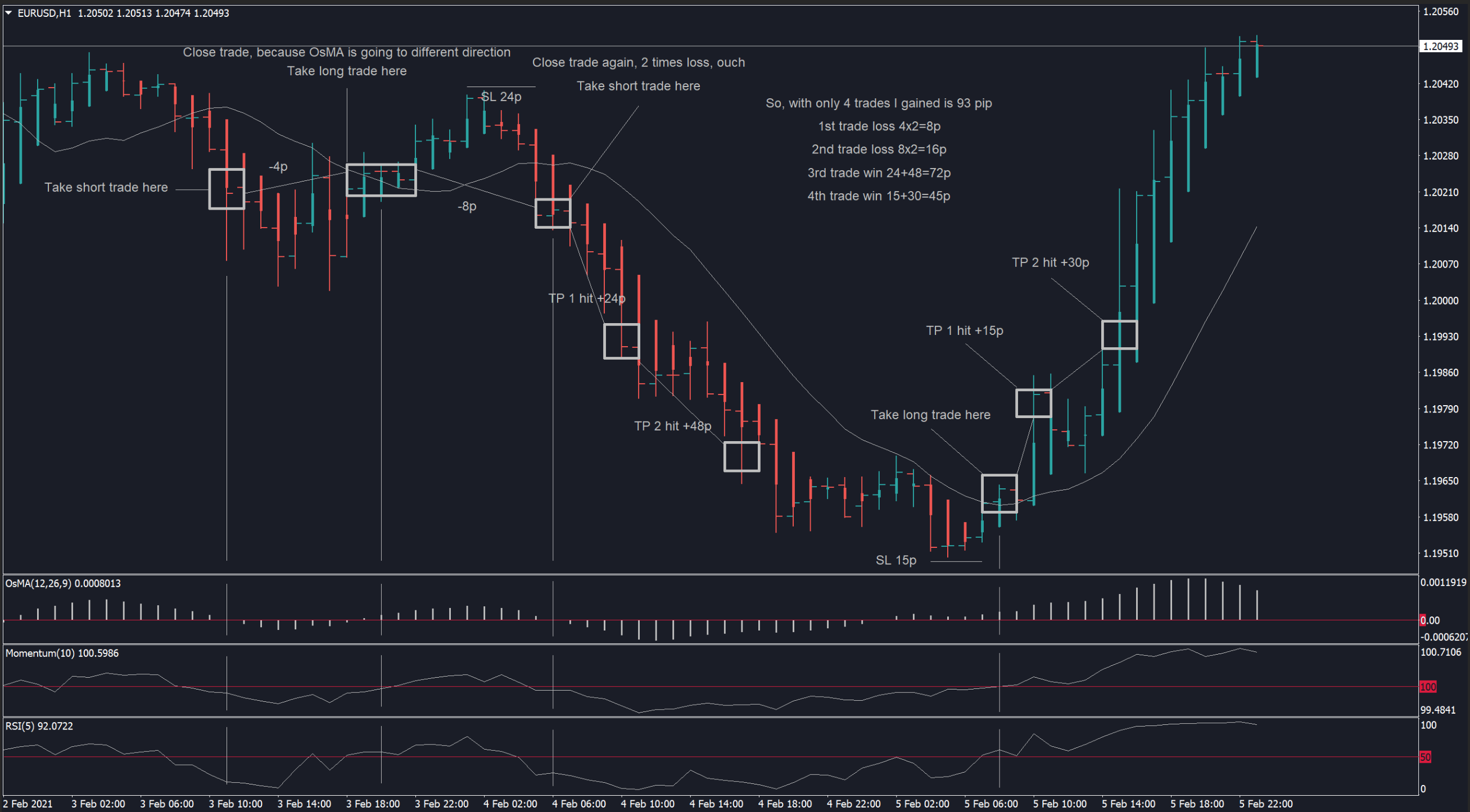
- Heiken Ashi is close above MA 14
- OsMA is above 0
- Momentum is above 100
- RSI is above 50
SHORT Trade:
- Heiken Ashi is close below MA 14
- OsMA is below 0
- Momentum is below 100
- RSI is below 50
*Momentum and RSI is optional confirmation, you can take trade even if these 2 indicator didn't go above/below their level, but it will be a risky trade, I personally take trade when one of them is above/below the level
Where to set SL and TP?
- When setting SL I'm usually set it to the nearest swing high/low, and set TP 2 time the SL, so my risk reward ratio is 1:2
- Close your trade if OsMA going to different direction (eg. you take LONG trade, OsMA is above 0, after couple hours OsMA is going below 0 that's your signal to close a trade)
- Of course you can set SL and TP by your own style
Here's how i usually take trade:
- Need 3 confirmation signal from the indicator
- If all indicator is confirmed then i take 2 trade order at closing candle
- Set my SL to nearest swing, and I'm using 2 TP level, 1st is 1:1 from SL and 2nd is 1:2 from SL (eg. I take trade at 1.2000, my SL is 1.1000, my 1st TP is 1.3000, 2nd TP is 1.4000)
- If my 1st TP is hit, then I will move SL to BE

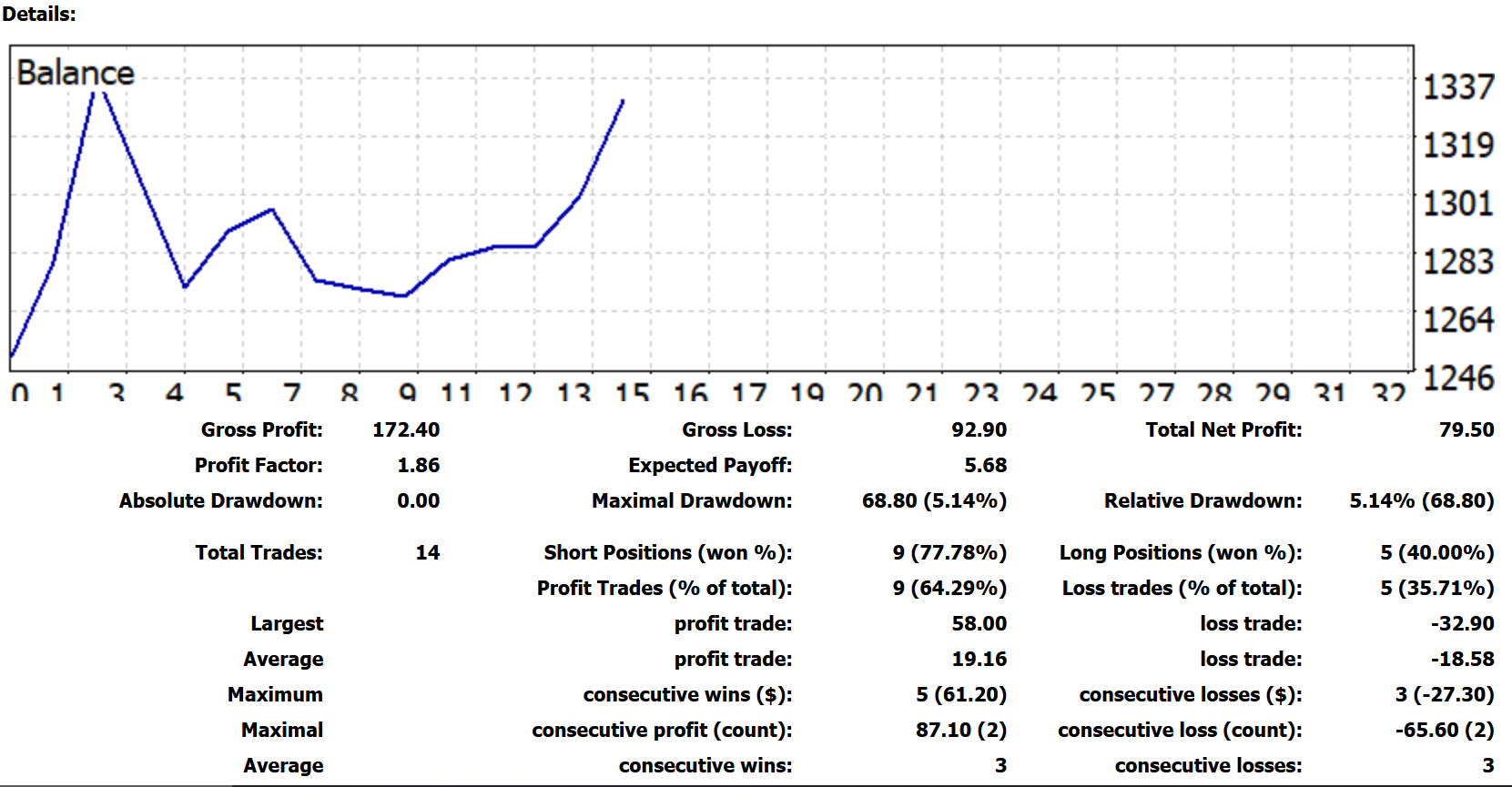
My first week trying this strategy, it's a live cent account, i will change to standart account after a month testing

Please try it, and share your trading here
- Easy to understand (you can look at the indicator a glance, and will know if it time to take trade, no messy line)
- Using 1H timeframe means, you don't have to look at chart every second, you can take a look every hour or couple hours
Now, what's the strategy? how do we enter a trade?
Here's how:
- Open a new clean chart
- Put Heiken Ashi to chart
- Add MA (Period: 14, Simple)
- Add OsMA with default setting (set level to 0)
- Add Momentum (Period: 10, set level to 100)
- Add RSI (Period: 5, set level to 50)
*or you can download the template below
HeikenAshi.tpl *change the candle to bar, so you can see where's the actual open and close price is without having open 2 chart
LONG Trade:
- Heiken Ashi is close above MA 14
- OsMA is above 0
- Momentum is above 100
- RSI is above 50
SHORT Trade:
- Heiken Ashi is close below MA 14
- OsMA is below 0
- Momentum is below 100
- RSI is below 50
*Momentum and RSI is optional confirmation, you can take trade even if these 2 indicator didn't go above/below their level, but it will be a risky trade, I personally take trade when one of them is above/below the level
Where to set SL and TP?
- When setting SL I'm usually set it to the nearest swing high/low, and set TP 2 time the SL, so my risk reward ratio is 1:2
- Close your trade if OsMA going to different direction (eg. you take LONG trade, OsMA is above 0, after couple hours OsMA is going below 0 that's your signal to close a trade)
- Of course you can set SL and TP by your own style
Here's how i usually take trade:
- Need 3 confirmation signal from the indicator
- If all indicator is confirmed then i take 2 trade order at closing candle
- Set my SL to nearest swing, and I'm using 2 TP level, 1st is 1:1 from SL and 2nd is 1:2 from SL (eg. I take trade at 1.2000, my SL is 1.1000, my 1st TP is 1.3000, 2nd TP is 1.4000)
- If my 1st TP is hit, then I will move SL to BE
My first week trying this strategy, it's a live cent account, i will change to standart account after a month testing
Please try it, and share your trading here

原帖附件 (1)
📦 帖子附件汇总 (2)
以下是回帖中所有共享的文件(2 个)。
💡 精彩内容推荐
✍️ 楼主最新发布
- •
- •
- •
- •
- •
- •
📌 热门专题入口
- •
- •
- •
- •
- •
- •
- •
- •
🔗 您可能感兴趣
- •
- •
- •
- •
- •
- •
🔐
请登录后参与评论
注册满12小时后评论,即可解锁附件下载
立即登录


